

Canon AE-1 battery replacement is simple once you know which battery the camera uses, how to recognize a dying cell, and the right way to swap it without damaging the contacts or ruining a roll of film. Understanding when and how to change the PX28 battery keeps your Canon AE-1 ready to shoot every time you pick it up.
What Battery Does the Canon AE-1 Use?
The Canon AE-1 is powered by a single 6V battery commonly labeled as 4LR44, 4SR44, PX28, PX28A, PX28L, or equivalents depending on the chemistry and brand. Modern replacements are usually alkaline (4LR44), silver-oxide (4SR44 or PX28-S), or lithium (PX28L, Duracell 28L, Energizer L544).
-
Canon originally specified a 6V alkaline or silver-oxide cell for the AE-1, and these modern codes are direct substitutes.
-
Lithium options often last longer and are more leak-resistant, which makes them a popular choice among film shooters today.
Why the Battery Matters in the Canon AE-1
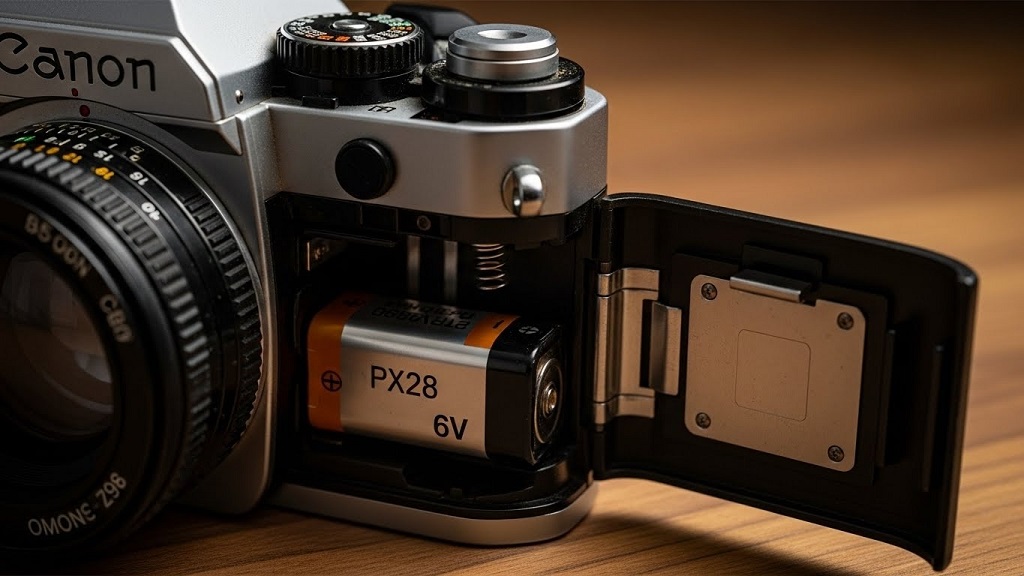
In the Canon AE-1, the battery does much more than just power a light meter. Without a healthy battery, many of the camera’s core functions simply stop working.
-
The 6V cell powers the electronically timed shutter, the light meter, the viewfinder display, and the battery check circuit.
-
If the battery is dead or missing, the shutter will not fire correctly, the meter needle will not respond, and the camera can appear completely “dead.”
When to Replace a Canon AE-1 Battery
Knowing when to replace a Canon AE-1 battery helps you avoid dead-camera moments on important shoots. Watch for these common warning signs that your PX28 is on its way out.
Key signs your Canon AE-1 battery is dying
-
Battery check needle does not reach the proper zone or behaves erratically when you press the battery check button while looking through the viewfinder.
-
Shutter will not fire, only fires intermittently, or the film advance lever feels normal but nothing happens when you press the shutter.
-
Viewfinder indicators (such as meter needle or warning lights) fail to move or light properly, even with good light and correct settings.
Preventive replacement timing
-
With normal use, a fresh PX28-type battery can last many months, but age, cold, and corrosion shorten life.
-
For regular shooters, many photographers replace the Canon AE-1 battery at least once a year or before a major trip or project to avoid unexpected failures.
If you notice “Canon AE-1 dead battery” symptoms—no meter, no shutter, and no response to the battery check—assume the cell is depleted and start with a replacement before suspecting deeper electronic problems.
How to Replace the PX28 in a Canon AE-1
Replacing the PX28 in a Canon AE-1 takes only a few minutes if you follow the correct order. Always switch film handling and battery changes in a safe environment where you can work carefully.
Step-by-step Canon AE-1 battery replacement
-
Locate the battery compartment
-
The battery chamber is found on the front of the camera body near the grip area, behind a small cover.
-
-
Open the battery door
-
Use the tool built into the camera’s grip, a coin, or a small flat screwdriver to press the release slot so the battery door pops open.
-
-
Remove the old battery
-
Gently pull out the old 6V cell, noting which end is positive (+) and which is negative (–) based on the diagram inside the compartment.
-
If there is white or green residue on the contacts, it may be corrosion from a leaking battery and should be cleaned carefully.
-
-
Check and clean the contacts
-
If corrosion is present, carefully clean the metal contacts with a cotton swab and appropriate cleaner, making sure no liquid gets deep into the camera.
-
-
Insert the new PX28-type battery
-
Align the negative end first as indicated in the diagram, press it against the spring, then push the positive end into place.
-
Confirm that the battery sits flat and does not rock or shift inside the chamber.
-
-
Close the battery door
-
Push the door closed until it clicks securely so that the cell maintains consistent contact.
-
-
Use the battery check function
-
Look through the viewfinder and press the dedicated battery check button; the meter needle should move into the acceptable range to show the battery is good.
-
These steps work for any compatible replacement cell, whether you use an alkaline PX28, a silver-oxide PX28-S, or a lithium PX28L.
Canon AE-1 Battery Options and Adapters
If you cannot find a battery labeled exactly “PX28,” other equivalent codes and options will work as long as they are 6V and fit the chamber.
-
Common labels include 4LR44 (alkaline), 4SR44 or PX28-S (silver-oxide), and PX28L or 28L (lithium).
-
Some photographers use adapters that take four LR44 or SR44 button cells and convert them into a 4LR44/PX28-size unit, which can be cheaper and easier to source in some areas.
Always confirm voltage before installing any alternative battery or adapter; using a 3V or 12V cell of similar size can damage the camera electronics.
Troubleshooting “Canon AE-1 Dead Battery” Symptoms
Sometimes a Canon AE-1 seems dead even after a fresh PX28 replacement. Before assuming the camera is beyond repair, work through a quick checklist.
Quick checks after installing a new battery
-
Confirm the cell is oriented according to the diagram inside the battery chamber and that the door fully latches.
-
Press the battery check button while looking through the viewfinder; if the needle still does not move, try another new battery from a different package in case the first one was defective.
If the battery test fails with more than one fresh cell, you may be dealing with corroded contacts, a broken wire, or a deeper electronic fault. In that case, a camera technician or repair shop experienced with Canon A-series bodies can test the circuits and check for shutter magnet or power drain issues.
Battery Care Tips for the Canon AE-1
Good battery habits help protect your vintage Canon and reduce the risk of leaks or unexpected failures.
-
Remove the battery if the camera will sit unused for a long period to minimize leak risk inside the compartment.
-
Avoid mixing old and new cells in any adapter and always replace all button cells in an adapter at the same time.
-
Store spare PX28 or 4LR44 batteries in a cool, dry place and check their expiration dates before important trips or shoots.
These small practices extend both battery life and the lifespan of your AE-1’s electrical system.
FAQs About Canon AE-1 Battery Replacement
1. What battery does the Canon AE-1 use?
The Canon AE-1 uses a single 6V battery such as 4LR44, 4SR44, PX28, PX28A, or PX28L, depending on chemistry and branding.
2. How do I know when to replace my Canon AE-1 battery?
Replace it if the battery check needle does not reach the proper zone, the shutter stops firing, or you see erratic behavior from the meter and viewfinder indicators.
3. Will a dead battery stop the Canon AE-1 shutter from working?
Yes, the electronically controlled shutter in the AE-1 relies on battery power, so a dead or missing PX28 will prevent normal shutter operation.
4. Can I use an adapter with LR44 button cells instead of a PX28?
Yes, some adapters accept four LR44 or SR44 cells and convert them into a 4LR44/PX28-size battery, as long as the total voltage is 6V and the adapter physically fits the compartment.
5. How often should I replace the Canon AE-1 battery if I shoot regularly?
Many photographers replace the battery roughly once a year or before major trips, even if it still works, to prevent sudden failure.
6. What should I do if a new battery does not fix my “Canon AE-1 dead battery” issue?
If a fresh, correctly installed battery does not restore the meter or shutter, inspect the contacts for corrosion and consider having a repair technician check for internal faults such as wiring or magnet issues.
7. Is it safe to leave the battery in the AE-1 long-term?
Leaving the battery in for everyday use is fine, but for long-term storage it is safer to remove it to reduce the risk of leakage inside the body.
Related Topics: The Rise of TikTok Micro-Influencers: Why Small Creators Drive Big Results
Related Topics:: Anime Music Attack on Titan: Hiroyuki Sawano 2013 Review
